- GA4
- GTM
- sGTM
- Google Ads
The ad source is lost between domains. For example, the brand site, the city site and the booking platform
What is wrong
The ad leads to one website, and the booking or purchase happens on another: a partner's site, another city's site, a booking platform. In the reports that booking shows up as "direct" (the visitor came on their own) or as "referral from a site", and the ad that brought it gets no credit.
Example. In a month, ads brought 100 bookings, but 40 of them were completed on another site. Google Ads sees 60. The ads learn from 60, the report shows a result almost twice as bad as the real one, and the budget gets cut in the campaign that brings bookings. The bookings that disappear are exactly those of people who went through several sites, that is, the most interested ones.
The legend in this demo: a network of travel agencies in Vietnam. The network runs a brand site, every city is a separate franchise with its own site, its own ad budget, its own Tag Manager and its own reports, and bookings are completed on an external platform that carries none of our tags. All three businesses are fictional.
What the business loses
- The ad identifier is lost on the way. Google Ads and Meta optimise towards the conversions they can see. A booking that never makes it back to the ad platform does not exist for bidding.
- In analytics the sale is "direct". The booking shows up as direct or as a referral from the network site. In the reports the franchise's ads look useless, and its budget is the first one cut.
- Two views, both true. For the network owner, a customer who clicked a Da Nang ad and booked in Nha Trang is still a sale. For the Da Nang franchise it is a lost budget. A customer who left Da Nang, wandered through the network and came back to Da Nang is a gap for both: the ad that found them gets no credit, and the algorithm learns nothing.
Ways to close the gap
| Option | Pros | Cons | In the demo |
|---|---|---|---|
| One Google tag on every domain (GA4 cross-domain linking) | The official path: Google itself carries the visitor's identifier between your domains inside the link. | Needs one property (analytics account) and one owner across all domains, and that is not always available. In this fictional example the two franchises are two separate owners with their own properties, so the linking does not apply. It does nothing for a booking platform you cannot tag. | description only |
| A signed hand-off between sites | Each site keeps its own container and its own property. The first site asks our server for a single-use code and adds it to the link; the second site exchanges the code for the journey and sets its own cookie. Two cookies, two properties, one journey. | Your own server and a journey record on it. The code is only issued when consent allows it. | in the demo |
| A traffic-source reference stored on the booking, returned by the platform's webhook (an automatic notification to your server) | Reliable: the confirmed booking comes back with the journey code on it. | The platform needs a field for it. Checkfront, Regiondo and Bokun have one; FareHarbor states that no tracking information can be passed through parameters or cookies. Checked per platform; the option is not always there. | in the demo |
| Redirect back to a thank-you page | Simple. The thank-you page, which has our cookie, attaches the booking. | Only if the platform can send the visitor back to your domain with the booking id. The visitor may never reach that page. | in the demo |
| The platform's widget on your own domain (the platform's window inside your page, which emits an event) | The visitor stays on your domain, but the booking form is still drawn by the platform: you embed its widget and receive a "booking created" message from it. | Breaks where the widget sits in a window inside another window, or where the consent state does not reach it. The event arrives only if the platform emits one. | in the demo |
| Booking through the platform's API from your own site | The form is yours and the platform only receives the data: your site creates the booking through the platform's programming interface, and the visitor never sees the platform. Unlike the widget, you control both the form and what data goes to the platform. | Development on your side. Not every platform exposes such an interface. | in the demo |
| Matching by time, tour and price when the platform returns nothing | Works when the platform gives nothing. | It is a guess, and the demo labels it as a guess: status INFERRED, confidence below 1.00, one click matched to at most one booking. | in the demo |
What the demo does
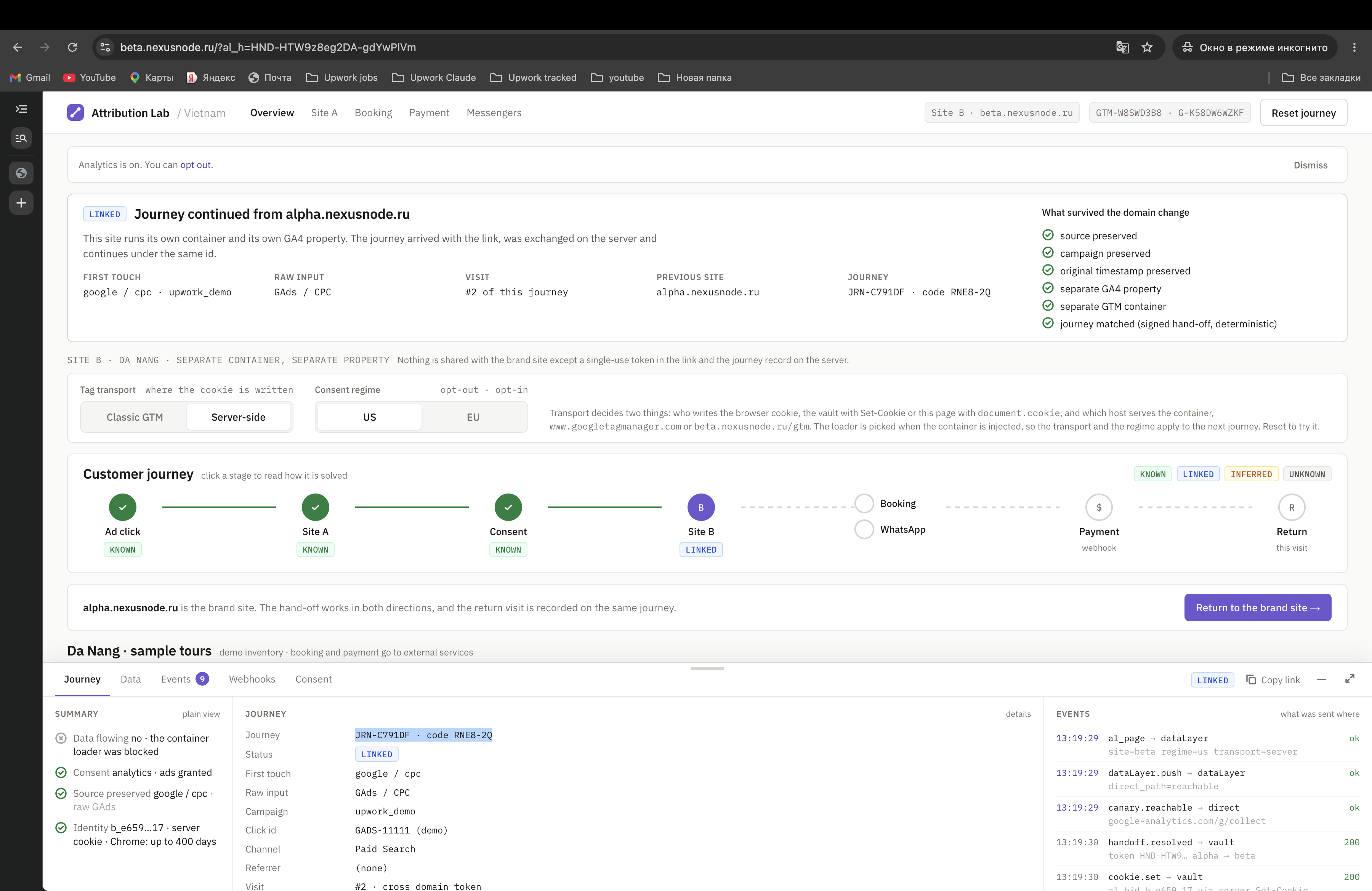
The demo keeps one journey record on its own server. Site A (the network) hands the journey to Site B (the franchise) with a single-use signed code. Site B carries the journey code into the booking platform as a reference. The platform posts a webhook with that reference, and the booking is joined to the journey: method booking_reference, confidence 1.00, status LINKED. The other four platform behaviours are one switch away, so you can compare them on the same journey.
Consent decides whether any of this happens. In the opt-out regime (US and most of the world) the journey is created at once. In the opt-in regime (EU, UK, CH) nothing is stored and no code is issued until the visitor accepts. Decline, and the hand-off link says why: "No hand-off token: consent was not given, so no cross-site identifier is passed."
Open the demo
It opens already set up for this case, with server-side transport. The steps below describe a visit from Google Ads, which is selected by default. Use a private window for a clean run, because the regime and the transport stick in the browser.
https://alpha.nexusnode.ru/?utm_source=GAds&utm_medium=CPC&utm_campaign=case_cross_domain&demo_click_id=GADS-11111&al_case=cross-domain-journey&al_lang=en&al_transport=server&al_regime=autoWhat you will see:
- Site A, the network. Open the panel with "Show what was recorded" at the bottom of the screen. It says KNOWN (the source is known): first touch
google / cpc, raw inputGAds / CPCkept next to the normalised value, click idGADS-11111 (demo). - Continue to the regional site. Site B opens with LINKED (the journey is joined), "Journey continued from alpha", visit #2, and a list of what survived the domain change: source, campaign, original timestamp, separate GA4 property, separate GTM container.
- Book a tour. Above the tours, choose what the platform does with the link: API, Reference, Embed, Redirect back, No signal. Confirm the booking on the platform host, which carries no tag of ours. Back on the site, open the panel if it is closed: the Journey tab shows how the booking was joined:
booking_reference 1.00 LINKED, orprobabilistic 0.80 INFERRED(a guess) with the rule spelled out, or UNKNOWN (the link is lost). - Data tab. Every key the demo writes in your browser, and who set it. Two of them,
FPIDandFPLC, are set by the server container on the parent domain, so the browser carries them to the booking host as well, which neither reads nor sets them. The demo shows this in the table as it is.
Frames

What the demo does not prove
- That your booking platform will accept and return a reference. That is checked against the platform's documentation and settings, vendor by vendor.
- That the source arrives in Google Ads. The demo click id is evidence of the click and is never sent to Google Ads; validating a real
gclidneeds a live campaign. - That the identifier survives weeks in every browser. The demo sets its cookie from the server, which makes the identifier more durable than a script-written one; long-term browser tests are a separate step.
Who built this
Anton Kozhanov – marketing data and attribution engineer. Own server-side Tag Manager on own infrastructure, a first-party loader and cookies, a journey vault with export and deletion. Four years on a theatre's measurement (revenue ×2.3 on his watch, ad spend held near 7% of revenue) and a call-tracking → CRM → ads feedback pipeline for a manufacturer (cost per lead −25%, a 2.5-year low).
Book a call
Bring your website, booking platform or CRM. We trace the same journey on your systems and decide what is worth fixing first. If you walked through the demo, I open your journey record on the call: what was recorded, what was linked, what was lost.