- GA4
- GTM
- sGTM
- Google Ads
Cookie consent for visitors from Europe: what your ads lose and how to lose less
This page is for a business with no company, branch or office of its own in the EU or the UK. If you have one, there is a separate page for you: the law applies to you directly there, and some ways to cut the losses need a decision with a lawyer.
What is wrong
Under EU and UK rules, no cookie (a marker in the browser that lets the site recognize a visitor and tie their purchase to an ad) may be set and no data sent to Google before the visitor consents. So for visitors from those countries the site shows a cookie consent banner. Some click "Decline", some click nothing and move on – and the easier the banner is to miss, the more people ignore it.
If there is no banner, or it does not pass a consent signal to Google, Google treats every visitor from the EU, the UK and Switzerland as not consenting, including those who would have clicked "Accept". With a banner and the signal, you lose only those who did not accept right away. For each of them your ads lose data:
- Audiences. The visitor does not enter remarketing lists (lists of visitors for repeat ads) and does not get personalized ads. This is Google's rule since March 2024 (Consent Mode v2).
- Conversions. The purchase is not tied to the ad. Google decides who to show ads to based on the purchases it sees, and it learns without this one. In the reports this looks like a drop in conversions, and nobody can say whether demand fell or tracking broke.
- The first touch. If the visitor accepts only on the third page, the source they came from is already gone by then.
- The journey between domains. If you have several domains, say the site and a separate booking platform, without consent the visitor's journey breaks at the hand-off, and the booking on the second domain has no source. More in the case "The ad source is lost between domains".
You can estimate your loss. With no banner or no signal, it is every visit from the EU, the UK and Switzerland. With them, it is the share of those visits where the visitor did not click "Accept"; your consent banner service usually shows it.
The opposite mistake is to treat everyone as consenting: setting cookies before consent, filing ad cookies under "strictly necessary" (those need no consent), or telling Google by default that consent was given. The numbers in the reports stay, but on European traffic this breaks Google's rules for advertisers, and Google may restrict or suspend the ad account. And in the US, hidden data collection is a risk in its own right: claims come under state laws and through class actions.
What is mandatory if your company is not in Europe
Google's requirements. Google requires advertisers to pass a consent signal for visitors from the EU, the UK and Switzerland, wherever the business itself is based (Switzerland included, although its own law is softer). The requirement is part of Google's rules for advertisers and applies whatever the law of your country says.
A consent signal is a flag that Google tags (the ads and analytics code on the page) send with every event: whether the visitor agreed to ads and analytics. The consent banner sets it. Most banner services can do this on their own; ask whoever set up your site whether Consent Mode v2 is on and what goes to Google after "Decline".
The law is a question for a lawyer. Cookie fines are issued by the regulator of a particular country, almost always on a complaint; spot checks mostly cover large local sites. Formally the European rules cover you too, but in practice they reach mostly businesses with a company, branch or office in Europe: collecting a fine from a business with no presence there is hard. This page is not legal advice – assess your own situation with a lawyer. It covers the technical side: how the site behaves on every answer the visitor gives, and how to lose less data.
How to lose less
1) Write nothing to the browser before a decision, keep the source in page memory
The usual consent flow (Basic consent mode): before the visitor decides, Google tags do not load and nothing is written to the browser. A visitor who accepts is counted as usual, in conversions and in audiences.
On top of the standard flow the demo does two things. The source of the visit waits in page memory and is saved as soon as the visitor clicks "Accept". On decline, your own server keeps an anonymous visit count: where they came from, no cookie, no visitor identifier.
Cons: page memory lasts only while that page is open; if the visitor moves to another page without deciding, the source is lost. Google does not fill in the missing conversions (step 4 does that).
In the demo.
2) Show the banner only to visitors from Europe
The flow follows the visitor's country: consent in advance for the EU, the UK and Switzerland, a notice with a way to opt out for everyone else. Visitors from other countries are counted at once and do not wait for a decision. For the US this includes honoring Global Privacy Control (the browser's "do not sell my data" signal) and a "Your Privacy Choices" opt-out link: several state laws require them, mostly from large companies and sites with large audiences.
Cons: the country is guessed from the connection address (IP), approximately.
In the demo: the Auto regime by the visitor's country. Global Privacy Control and the "Your Privacy Choices" link are planned.
3) Ask for the decision before the visitor moves on
Links and buttons on the page do nothing until the visitor chooses: accept or refuse, both buttons equally easy. This cuts the number of people who do not mind but never click. And the decision happens on the first page, while the source is still in memory.
Conditions: refusing is as easy as accepting, and the site stays open to those who refused. Whether this is acceptable in your market is worth checking with a lawyer. In the demo the banner does not block.
Description only.
4) Advanced consent mode: fill in part of the conversions with statistics
Before consent, Google tags load anyway and send anonymous signals – no cookie, no visitor identifier. From them Google estimates the missing conversions, and part of the losses comes back into the reports as an estimate.
Cons: the estimate appears only at large volumes. GA4 (Google Analytics), for example, starts filling in from a thousand consenting visitors a day, and a small site never gets there. European regulators view these signals differently, and one reading says even they may not be sent before consent. The demo does not use this mode: it shows the most cautious flow, the one that also suits companies in Europe.
Description only.
What the demo does
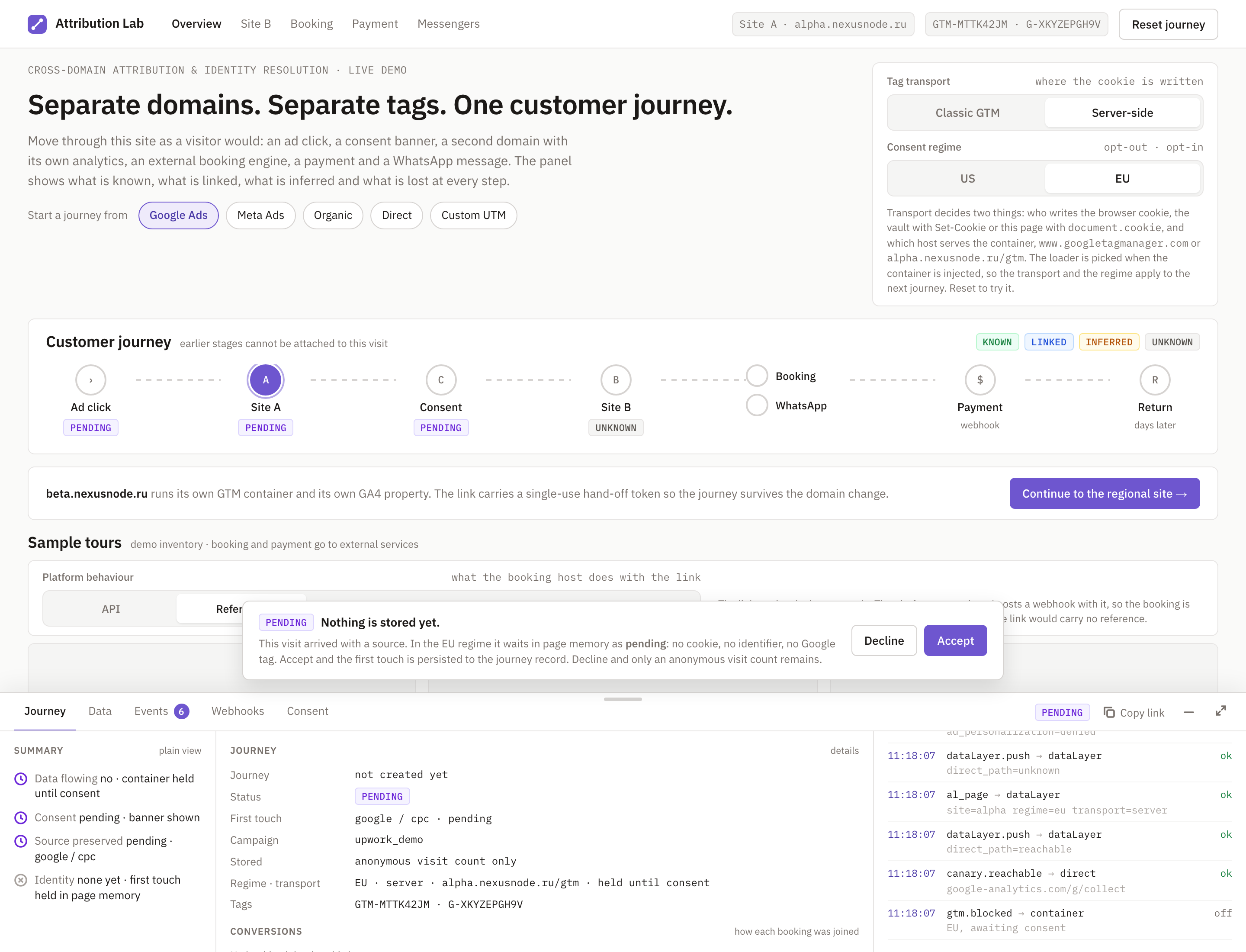
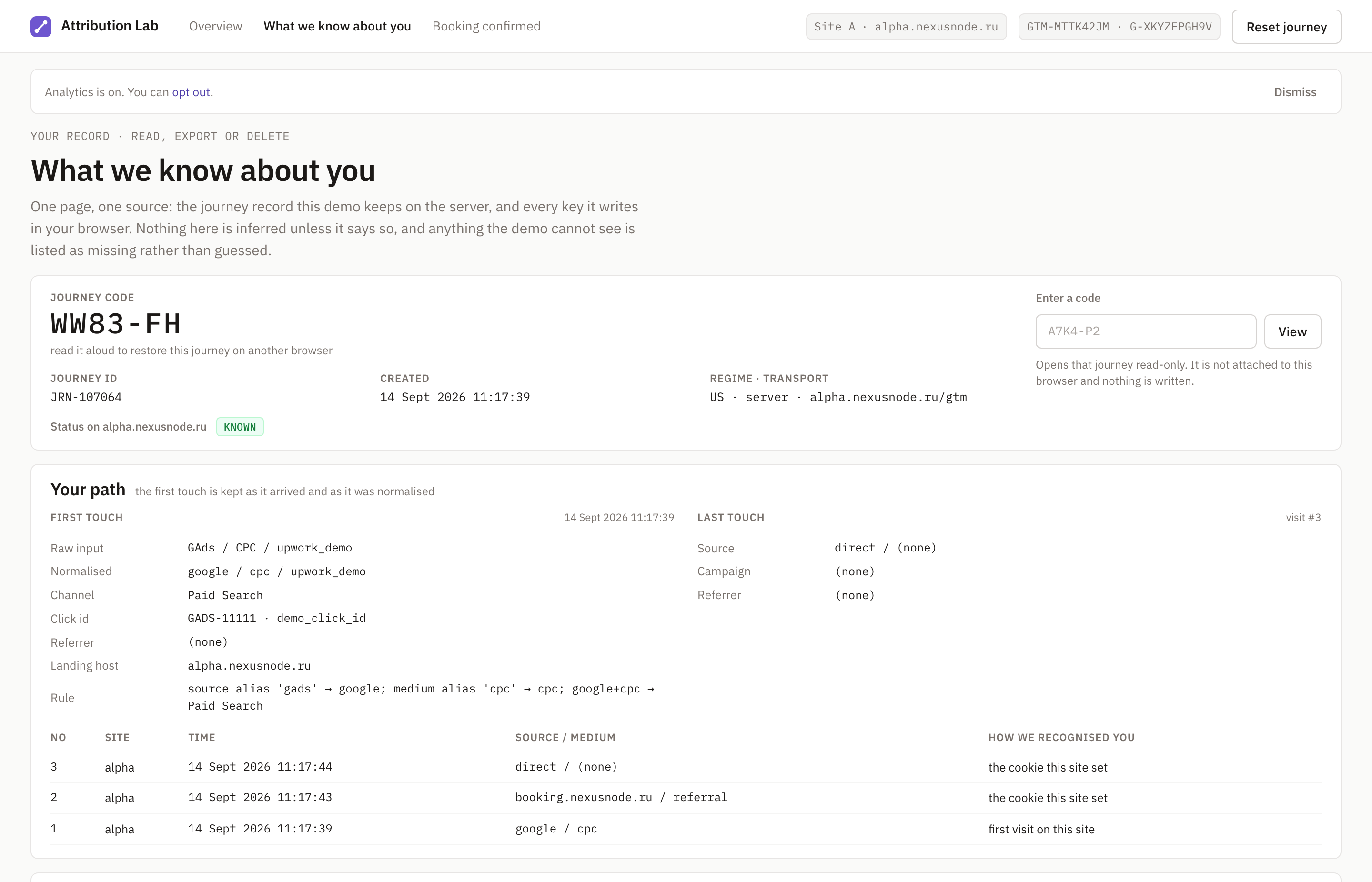
In the opt-in regime (consent in advance) nothing loads and nothing is written to the browser before the visitor decides: no cookie, no identifier, no journey record. The source the visitor came from waits in page memory. After "Accept" it is saved to the journey, the server sets the cookie, the tags load. After "Decline" only an anonymous visit count remains on the server. Moving to the second site without consent passes no identifier, and the page says why. Permission for analytics and permission for advertising are stored separately: remarketing audiences depend on the second one. In the opt-out regime (a notice with a way to opt out) the journey is created at once, with a notice strip and an opt-out link. The Auto regime picks the flow by the visitor's country. The "what we know about you" page shows the visitor everything stored about them, with export and deletion: that is how a site answers "what do you keep about me".
Open the demo
The demo opens already set up for this case: server-side transport, and by default the visit counts as a Google Ads click with a demo click id. Start with "Force EU – opt-in": that is where consent is visible. Use a private window for a clean run, because the regime and the transport stick in the browser.
https://alpha.nexusnode.ru/?utm_source=GAds&utm_medium=CPC&utm_campaign=case_consent&demo_click_id=GADS-11111&al_case=consent-regimes&al_lang=en&al_transport=server&al_regime=autoWhat you will see in the opt-in regime:
- The consent banner: "Nothing is stored yet." Click "Show what was recorded" to open the panel: no journey created, the source
google / cpcwaiting, only an anonymous visit count on the server, no Google tags loaded. - Click "Continue to the regional site" before deciding. The page answers that no hand-off token was issued because consent was not given. Site B opens with no link to the first site and names the same reason.
- Click "Decline". "Nothing stored. Reload keeps you anonymous." No cookie, no identifier, no journey.
- Or "Accept". The tags get permission, the server sets the cookie, the journey is created with the source
google / cpcsaved from the wait. The Consent tab lists the consent commands issued, in order. - Open "What we know about you" from the panel. Your path, how the site recognizes you, the consent history, a table of every key stored in your browser with who set it, and export and delete for the whole record.
In the opt-out regime the journey is created at once, the strip says "Analytics is on. You can opt out.", and the opt-out link opens the Consent tab.
Frames
What the demo does not prove
- That this is the right setup for your market. Jurisdiction, purposes and platform requirements are checked for the actual business. This is not legal advice.
- What Advanced consent mode would recover. It is not in the demo: the demo shows the most cautious flow.
- The full banner. This one has two buttons. A three-action banner with a Customize step, Global Privacy Control (the browser's "do not sell my data" signal) and a "Your Privacy Choices" link are planned.
- That an anonymous visit count is enough for your reporting. It keeps source and channel, and nothing that ties to a person.
- What the ad platform forgets. The "what we know about you" page deletes our record. What a platform does with data it already received is up to the platform.
Who built this
Anton Kozhanov – marketing data and attribution engineer. Own server-side Tag Manager on own infrastructure, a first-party loader and cookies, a journey vault with export and deletion. Four years on a theatre's measurement (revenue ×2.3 on his watch, ad spend held near 7% of revenue) and a call-tracking → CRM → ads feedback pipeline for a manufacturer (cost per lead −25%, a 2.5-year low).
Book a call
Bring your site, your consent banner if you have one, and the drop you cannot explain. We check what your setup stores and sends to Google before the visitor decides, after "Accept" and after "Decline", and decide what is worth fixing first. If you walked through the demo, I open your journey record on the call: what was held, what was saved, what was refused.